Adaptive Cruise Control & Following Distance
Adaptive Cruise Control
You may hear it called:
Adaptive Cruise Control
ACC
Active Cruise with Braking
What is Adaptive Cruise Control?
Adaptive Cruise Control (ACC) is an advanced form of cruise control. Like regular cruise control, it keeps your truck at the speed you set. However, if the system detects a slower vehicle in front of you, it can automatically slow the truck down to help maintain space between vehicles.
For example, if your cruise control is set to 50 mph and traffic ahead is moving at 45 mph, the truck will slow down to match traffic speed. Once traffic ahead starts moving more quickly, or you change lanes, the truck will speed back up to your set speed.Forward Collision Warnings alert you of a potential crash with a lead vehicle by issuing an alert. Each system is different, and your vehicle may alert you by using any combination of visual alerts, auditory alerts, or vibration alerts. Check your owner’s manual for details.
Good things to know:
Distance settings
Most systems let you choose how closely the truck follows the vehicle in front of you. The selected distance determines how much space is between you and the vehicle in front of you. There may be a button on the steering wheel or on the touch screen menu to adjust the distance. This setting may be limited or potentially unavailable based on fleet management policies.
Unexpected behavior
There may be times when adaptive cruise control brakes or accelerates unexpectedly; always monitor surrounding traffic and be prepared to take over if necessary. How the system reacts can depend on the truck (e.g., current speed and following distance), driver settings, traffic, and road conditions. Be prepared for the possibility of unexpected behavior. As an example, while driving you see a vehicle ahead with a right turn signal activated, slowing to turn into a parking lot. You, as the driver, understand the vehicle will be out of the roadway before you reach it and therefore do not take action; however, the system may see that vehicle as a potential hazard and begin braking to avoid a collision.

Limitations
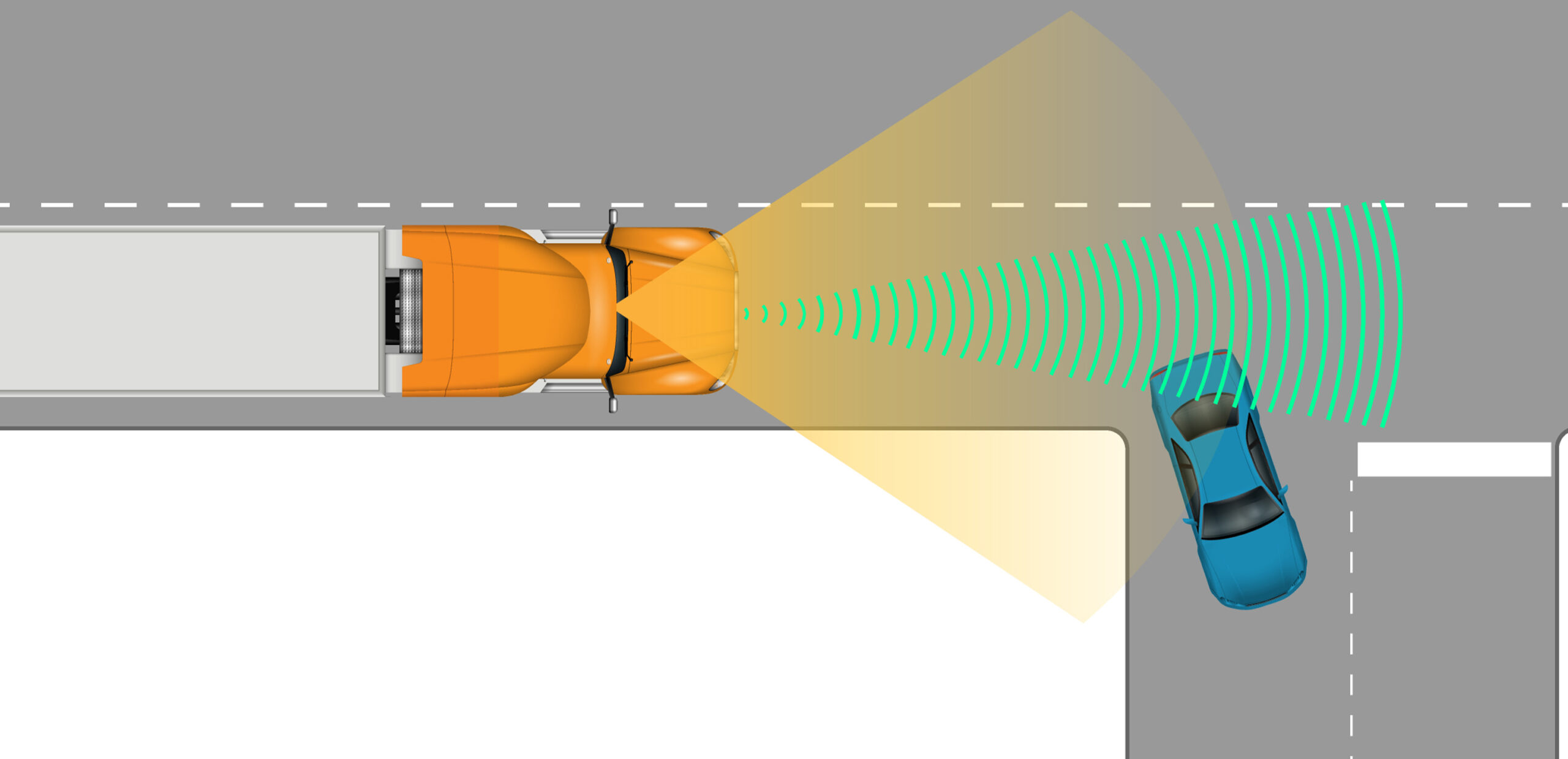
While driving through curves, the system may briefly “see” a vehicle in a nearby lane or roadside object as being in front of you. This can cause unexpected slowing or braking; you should always stay attentive.
Upgraded Features
Some systems include advanced capabilities. Please check with your owner’s manual or safety manager to see if your system has these features.
Stop-and-Go Traffic
Some adaptive cruise control systems can slow you all the way to a stop in traffic and automatically accelerate when traffic starts moving. Others will turn the system off if your speed gets too low or may require you to manually resume speed control.

Auto Resume
After slowing behind a vehicle, some systems will automatically return to your set speed once the lead vehicle accelerates. Resume timing may vary between trucks.

Multi-Lane Detection
Some systems will track multiple vehicles in adjacent lanes in addition to the vehicle directly in front of you. If you make an emergency maneuver, the system has improved logic to quickly re-evaluate your path and switch the system response to the vehicle that is now most relevant, including one in a nearby lane rather than only the original lead vehicle.
Traffic Sign Recognition
When you set your speed for adaptive cruise control, some trucks can read speed limit signs and display them to the driver. Certain systems may simply issue warnings if the truck is traveling above the posted speed while others can adjust the truck’s set speed down when entering a lower speed zone.
Following Distance Alerts
You may hear it called:
Following Distance Alert
Following Distance Warning
Tailgate Warning
What are Following Distance Alerts?
The Following Distance Alerts are intended to warn you when you are too close to a lead vehicle. The default threshold for alerts can vary by system. Often this is expressed as seconds of following, which supports greater following distances at higher speeds. When you exceed these thresholds, your truck will give you driver an auditory, visual, and/or vibration alert. However, the specific thresholds can vary by fleet settings and manufacturer. Please check with your vehicle’s owner manual for specific information about close following distance alert thresholds in your truck.
Watch out for:
Wet roads
Rain, snow, ice, and wet pavement can change how quickly you are able to slow down or stop.
Obscured sensors
Ensure the sensors are clean and clear of debris, snow, or mud which can prevent the system from functioning correctly.
Sensor alignment
Long miles on rough roads and impacting objects (e.g., deer, road debris, etc.) can negatively affect the alignment of the radar sensor and prevent the system from functioning correctly. Camera alignment is also critical; when the windshield is replaced, improper camera alignment may prevent the system from functioning correctly. Be sure to notify your company if truck sensors need to be recalibrated.
Sudden cut-ins
If other vehicles cut in front of you, the following distance alerts may trigger as the vehicle is temporarily too close. Once the proper following distance is reestablished, the alert should stop. Curves, merging traffic, motorcycles, and smaller vehicles can also make it difficult for the system to alert.
Stopped vehicles
Some following distance systems may not respond the same way to stopped vehicles as they do to moving vehicles. You should stay alert and always be prepared to brake or steer around stopped traffic, construction zones, or vehicles on the side of the road.
Common Myths
Myth #1
If the system is not alerting, my following distance is safe.
Fact #1
Following Distance Alerts use sensors and preset thresholds, but they cannot account for every situation.
These alerts may occur too late to avoid a crash depending on speed and how heavy your truck is.
Myth #2
Following Distance Alerts take into account weather, road, and truck conditions.
Fact #2
A Following Distance Alert only measures distance to the vehicle in front of the truck.
It does not account for the roadway conditions, precipitation, or the condition of the truck’s brakes and tires.
VTTI provides this information for general knowledge and education. However, VTTI does not guarantee the accuracy, completeness, or applicability of this information to any specific vehicle or situation. Drivers are strongly encouraged to consult their vehicle’s owner’s manual for detailed instructions and guidance on the proper use and functionality of these systems.